
Creating a Y999 account is the first step if you want to use account-based features such as the game lobby, wallet, promotions, referral options, and other personalised sections. The registration process is usually simple, but new users should enter their details carefully because the same information may later be used for login, password recovery, or payment verification.
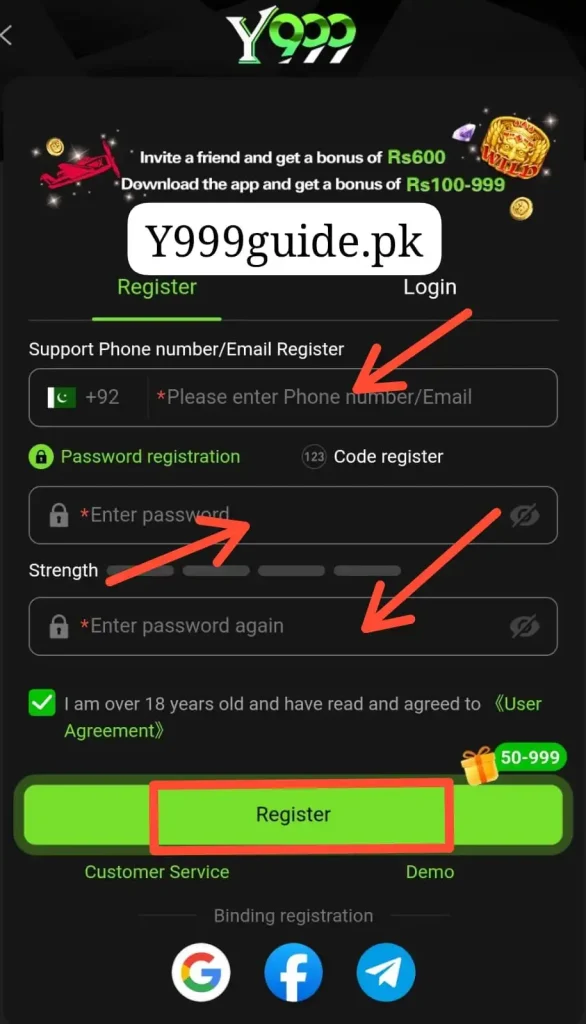
This guide explains how to register on Y999 Game, what information you may need, how referral codes work, and what to do if registration is not working.
How to Register on Y999 Game
Y999 has a dedicated registration flow for new users. The exact fields can change over time, so follow the form shown on the current Y999 registration page.
The normal process is:
- Open Y999 Game.
- Tap Register or Sign Up.
- Enter the information requested on the screen.
- Create a strong password.
- Enter an invitation or referral code if you want to.
- Complete OTP or other verification if requested.
- Review your details carefully.
- Tap Register or Create Account.
- Wait for the account to be created.
- Log in using the details connected with your new account.
Do not rush through the form. A wrong phone number or forgotten password can make account recovery more difficult later.
What Information May Be Required?
The exact registration form can vary depending on the current Y999 version.
You may be asked for information such as:
- Mobile number
- Username
- Password
- Confirmation password
- OTP or verification code
- Referral or invitation code
- Other account details shown by the platform
Only provide information requested through the actual Y999 registration form.
Never send your password, OTP code, wallet PIN, or banking password to another person claiming that they need it to register your account.
Choose a Strong Y999 Password
Your password protects access to your Y999 account.
Avoid simple passwords such as:
- 123456
- password
- Your mobile number
- Your name
- Your date of birth
Instead, use a password that combines letters, numbers, and other characters if the platform allows them. You should also avoid using the same password for Y999 that you already use for email, social media, banking, JazzCash, or Easypaisa.
Mobile Number Registration
Many gaming platforms use a mobile number as the main account identifier because it can also help with OTP verification or password recovery.
If the current Y999 registration screen asks for a mobile number:
- Use a number you control.
- Check the number before submitting.
- Make sure your SIM can receive messages.
- Do not use someone else’s number.
- Keep access to that number if it is linked with account recovery.
If you change your number later, update your account details if the platform provides that option.
What Is a Y999 Referral Code?
A referral code, invite code, or invitation code may connect your new Y999 account with an existing user’s referral campaign. Some promotions may offer benefits to the inviter, the new user, or both when certain conditions are met.
However, a referral code does not automatically guarantee:
- Free cash
- Guaranteed winnings
- Unlimited bonus money
- Instant withdrawals
- Permanent rewards
Always read the current referral or promotion conditions before entering a code.
Is a Referral Code Required?
- A referral code may be optional depending on the current registration form.
- If Y999 allows registration without one, you do not need to enter a random code just to complete your account.
- If you already received an invitation from someone and want to use it, check that you understand what the referral is connected with before submitting the form.
- Some platforms may not allow the referral relationship to be changed after registration.
How OTP Verification Works
Y999 may ask you to verify your account using a one-time password or verification code.
If an OTP is required:
- Enter your correct mobile number.
- Tap Send OTP or the equivalent option.
- Wait for the verification message.
- Enter the code in the required field.
- Complete registration.
An OTP should normally be used only on the registration or verification screen. Never share an OTP with someone through WhatsApp, Telegram, phone calls, or social media.
Y999 Registration After APK Installation
- If you downloaded the Y999 APK first, registration can usually be completed directly inside the app.
- Open the installed application and look for Register, Sign Up, or Create Account.
- If you have not installed Y999 yet, read our Y999 Game Download Guide first. After installation, return to the registration section and create your account.
Can I Register More Than One Y999 Account?
Creating multiple accounts may be restricted by the platform’s current rules.
Some gaming services limit accounts based on:
- Mobile number
- Device
- Payment account
- Identity information
- IP address
- Promotion eligibility
Creating extra accounts simply to claim the same new-user bonus more than once may also violate promotion terms. It is better to keep one properly managed account unless the platform clearly allows otherwise.
What to Check Before Completing Registration
Before tapping the final Register button, check:
- Your mobile number is correct.
- Your password is entered correctly.
- The confirmation password matches.
- Your referral code is correct if you are using one.
- You can access the mobile number or email connected with the account.
- You understand any promotion attached to registration.
A few seconds of checking can prevent problems later.
How to Log In After Registration
Once your Y999 account has been created, you can normally log in immediately.
The process is simple:
- Open Y999 Game.
- Tap Login.
- Enter your registered account details.
- Enter your password.
- Complete verification if requested.
- Tap Login.
If you want a more detailed explanation, read our Y999 Login Guide.
What Can You Access After Registration?
After successfully creating an account, you may be able to access platform sections such as:
- Game lobby
- Slot games
- Crash-style games
- Wallet
- Deposit or recharge area
- Withdrawal section
- Promotions
- Referral features
- Transaction history
- Account settings
- Customer support
The exact menu depends on the current Y999 version and your account.
Y999 Registration Bonus
You may see websites advertising a fixed Y999 registration or welcome bonus. Be careful with these claims because promotional amounts and requirements can change. If Y999 currently offers a new-user promotion, read the official promotion page or in-app terms to understand:
- Who qualifies
- Whether a deposit is required
- Minimum activity
- Wagering requirements
- Expiry date
- Maximum reward
- Withdrawal conditions
A promotional balance should not automatically be treated as cash that can immediately be withdrawn.
Y999 Account Verification
Some account features may require additional verification, particularly if payments or withdrawals are involved. Verification can help the platform confirm that account information and payment details belong to the correct user. If verification is requested, use only the current Y999 account section or support channel. Do not send identity documents or financial information to random contacts claiming to be agents.
Common Y999 Registration Problems and Solutions
| Problem | Possible Solution |
|---|---|
| Register button is not working | Refresh the page or reopen the app |
| Mobile number is rejected | Check the number format and remove typing mistakes |
| OTP does not arrive | Check network signal and request a new code after waiting |
| OTP shows as invalid | Use the newest code because older codes may expire |
| Username already exists | Try another available username |
| Password is rejected | Follow the password rules shown on the form |
| Passwords do not match | Re-enter both password fields carefully |
| Referral code does not work | Check that the code is correct and still valid |
| Registration page does not load | Switch to a stable internet connection |
| Account already exists | Use the login or password recovery option instead |
| Registration fails repeatedly | Contact the current platform support channel |
Y999 Registration Safety Tips
Account security should start during registration.
Use these basic precautions:
- Register through the intended Y999 platform.
- Create a unique password.
- Keep OTP codes private.
- Never share your account password.
- Do not pay someone to create an account for you.
- Avoid modified Y999 apps.
- Do not register through suspicious links sent by unknown people.
- Save your account ID privately if one is provided.
- Check login and payment details before entering sensitive information.
What If You Forget Your Y999 Password?
If you forget your password, do not immediately create another account.
Look for options such as:
- Forgot Password
- Reset Password
- Account Recovery
- OTP Verification
Follow the recovery instructions shown by the platform.
If a mobile number is linked with your account, you may need access to that number to complete the password reset.
Can I Change My Registration Details Later?
Some account details may be editable while others may be locked after registration. For example, a profile name or password may be easier to change than the mobile number linked with payment or verification features. Check the current Profile, Account Settings, or Security section before assuming a detail can be changed. This is another reason to enter correct information during initial registration.
Frequently Asked Questions
How do I register on Y999 Game?
Open Y999, tap Register or Sign Up, enter the information requested on the form, create a password, complete verification if required, and submit your account.
Is Y999 registration free?
Creating an account may not require a registration fee. However, real-money gaming features may require users to add funds separately.
Do I need a mobile number to register?
The exact fields depend on the current registration form. If a mobile number is requested, use one that you control.
Do I need a Y999 referral code?
Not necessarily. If the referral code field is optional, you may be able to create an account without one.
What is a Y999 invitation code?
An invitation code is normally connected with the platform’s referral system. It may link your new account with another user’s referral campaign.
Why am I not receiving the Y999 OTP?
Check your mobile number, network signal, message inbox, and whether you requested the code correctly. You may also need to wait before requesting another OTP.
Can I create another account if I forget my password?
It is better to use the password recovery feature first. Multiple accounts may be restricted by the platform.
Can I register after downloading the Y999 APK?
Yes. After installing the APK, open the app and use the registration option shown on the login or welcome screen.
Can I use the same password as my JazzCash account?
You should not. Use a separate password for Y999 and never share JazzCash, Easypaisa, banking, or email passwords with another service.
What should I do after registering?
Log in to your account, review the game lobby and account settings, and understand the wallet, promotions, and payment rules before using any real-money features.
Final Thoughts
Y999 registration is usually a simple process: open the platform, enter the requested details, create a secure password, complete any verification, and submit the form. The most important part is using accurate information and protecting your login credentials from the beginning. If you use a referral code or promotion, read its current conditions rather than assuming it guarantees a bonus or profit.